Switching Payroll Providers Mid-Year: A Zero-Downtime Migration Checklist
Date Released
25 August, 2026
If your payroll provider has been dropping the ball, missing tax filings, clunky reporting, and providing no real support when something breaks, you don't have to white-knuckle it until January. Switching payroll providers mid-year is one of the most searched payroll questions for a reason: business owners assume it's risky, and most guides don't tell you how to do it without a single missed paycheck. This checklist does.
At PayProNext, we built our payroll platform specifically to handle mid-year migrations without disrupting a single pay cycle. Here's exactly how a zero-downtime switch works, what to expect at each stage, and the questions most business owners ask before they commit.
Why Businesses Switch
Payroll Providers Mid-Year
Waiting for a "clean" January 1 start sounds appealing until you realize your current provider is costing you money and time every single pay period between now and then. Common triggers for a mid-year switch include:
- Hidden fees or a pricing structure that no longer fits your headcount.
- Recurring payroll errors, miscalculated overtime, wrong withholdings, late direct deposits.
- Outdated technology that can't support remote, hybrid, or multi-state employees.
- Support that disappears exactly when you need it most, like during an audit or tax notice.
- Growth that has outpaced your current provider's capabilities across multiple states.
None of these problems get better by waiting. A well-planned mid-year switch actually reduces risk, because you're not rushing into year-end tax season with a system you don't trust.
Can You Switch Payroll
Providers in the Middle of the Year?
Yes. Switching payroll providers mid-year is common and fully manageable, provided your new provider can accurately import your year-to-date (YTD) payroll data, gross wages, tax withholdings, deductions, and benefit contributions, for every employee. The trade-off compared with a January 1 switch is that your new provider has to carry forward partial-year totals instead of starting fresh, which is exactly why a structured migration plan matters so much.
Is It Difficult to Change
Payroll Providers?
Changing payroll providers is more of a coordination task than a technically difficult one. The complexity comes from timing, data accuracy, and communication, not from the switch itself. Most disruptions happen when a business skips the parallel run (testing both systems side by side before go-live) or fails to confirm which provider is responsible for a given quarter's tax filings. With a documented checklist and a provider experienced in mid-year transitions, most companies complete the process in two to six weeks depending on headcount and how many jurisdictions they operate in.
The Zero-Downtime
Migration Checklist
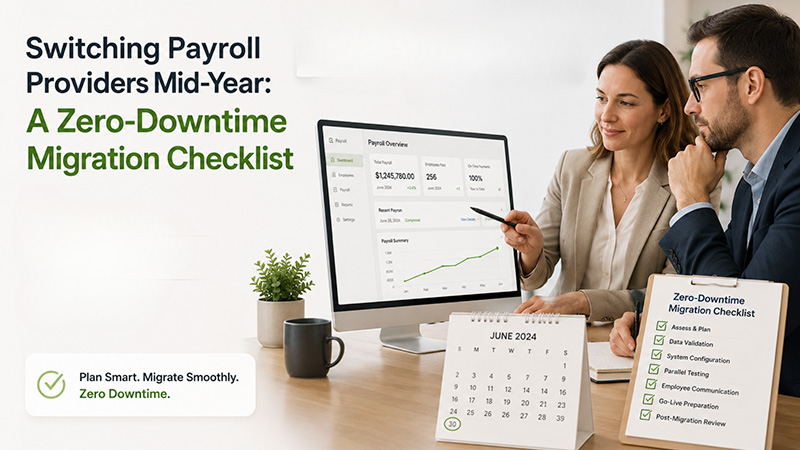
Here is the phase-by-phase framework PayProNext uses with every customer moving from another provider. Following this order is what keeps paydays on schedule.
|
Phase |
Timing |
What Happens |
|
Discovery & contract review |
6–8 weeks before switch |
Audit your current contract for notice periods and cancellation fees; define what's broken and what your new platform must fix. |
|
Data collection |
4–6 weeks before switch |
Pull year-to-date payroll totals, employee records, tax IDs, direct deposit details, and benefit deductions from your current provider. |
|
Parallel setup |
3–4 weeks before switch |
Your new provider builds your account and configures pay schedules while your old system stays live. |
|
Parallel run |
1–2 pay cycles |
Both systems calculate payroll side by side so you can compare results before anyone gets paid through the new platform. |
|
Tax transition |
Ongoing through go-live |
Confirm which provider files each quarter's returns so no payment or filing is duplicated or missed. |
|
Go-live |
First new pay date |
Employees are paid on schedule through the new provider; the old system is placed on standby, not deleted. |
|
Post-migration audit |
1–2 pay cycles after go-live |
Reconcile pay stubs, tax withholdings, and benefit deductions to confirm everything matches before closing out the old account. |
What Payroll Data Needs to Be Transferred?
A complete migration depends on moving every record that touches pay or tax accuracy. At minimum, plan to transfer:
- Employee master data: names, addresses, Social Security numbers, and employment dates.
- Year-to-date earnings, tax withholdings, and employer tax contributions for each employee.
- Federal, state, and local tax IDs, along with your EFTPS and state unemployment account details.
- Direct deposit and banking information, updated with employee consent.
- Benefit deductions, garnishments, retirement contributions, and paid time off balances.
- Prior quarterly tax filings and copies of any notices from tax agencies.
How Do You Migrate Payroll Data to a New
Provider?
Migration typically runs through three stages: export, validation, and import. Your current provider exports standardized reports (often CSV or a dedicated payroll data file); your new provider's implementation team maps that data into their system; and both sides reconcile totals line by line before anything goes live. At PayProNext, a dedicated migration specialist owns this mapping and validation step for you, rather than leaving your team to reformat spreadsheets manually.
Can You Switch Payroll Software Without
Missing a Payday?
Yes, and this is the entire purpose of a parallel run. Instead of shutting off your old system the moment the new one is ready, you run both systems for one or two full pay cycles, compare the outputs, and only cut over to the new provider once the numbers match exactly. Employees keep getting paid on the same schedule throughout; they should notice zero difference except, ideally, a better self-service experience.
Who Handles Payroll Taxes When Switching
Providers?
This is where most mid-year switches go wrong, so it deserves its own step. Before your new provider files or pays anything, confirm in writing which taxes your outgoing provider has already remitted for the current quarter. Whichever provider is active at the end of a quarter is typically responsible for that quarter's filing, but this needs explicit agreement between both parties, never assumed. PayProNext's onboarding team confirms this handoff with your previous provider directly, so nothing is filed twice or missed entirely.
What Happens to Year-to-Date Payroll
Information?
Your YTD totals move with you. Your new provider loads each employee's year-to-date gross wages, tax withholdings, and deductions so that W-2s and 1099s at year-end reflect the full year accurately, combining figures from both the old and new systems. This is the single most important data point in a mid-year migration, and it's worth double-checking against your last payroll register before go-live.
How Long Does Payroll Migration Take?
For a small to mid-size business with straightforward payroll, plan on two to four weeks from kickoff to go-live. Larger companies, multi-state employers, or businesses with multi-state payroll should budget closer to four to eight weeks to allow time for tax account verification and a full parallel run. Rushing this timeline is the most common cause of post-switch errors.
How Can Businesses Avoid Payroll
Disruptions During a Provider Switch?
- Choose your switch date around a pay period boundary, never mid-cycle.
- Run a full parallel pay cycle before disabling your old system.
- Get written confirmation of who files each tax quarter.
- Audit YTD totals against your last payroll register before go-live.
- Tell employees early: new pay date, same amount, new self-service login.
- Keep your old provider account active (not canceled) for 60–90 days after go-live in case you need historical records.
How PayProNext Makes
Mid-Year Migration Easier
PayProNext helps U.S. businesses transition from their current payroll provider without disrupting their regular payroll schedule. From YTD data migration to tax filing coordination, the process is designed to make switching providers simpler and more manageable.
When you switch to PayProNext mid-year, you get:
- Dedicated migration support to help with data mapping, validation, and setup.
- U.S. payroll compliance support for federal, state, and local payroll requirements.
- Parallel payroll testing to compare payroll calculations before go-live.
- Clear tax filing coordination so you know which provider is responsible for each filing during the transition.
- Employee self-service access with applicable payroll history carried into the new system.
Businesses don't switch payroll providers because it sounds fun; they switch because their current system is holding them back. With the right checklist and the right partner, you can make a mid-year payroll switch with less disruption, better visibility, and confidence in every pay cycle.
Frequently Asked Questions
Can you switch payroll
providers in the middle of the year?
Yes. It's fully possible and common, as long as your new provider accurately imports your year-to-date payroll totals and both providers agree on who handles the current quarter's tax filings.
Is it difficult to change
payroll providers?
Not technically difficult, but it requires coordination. Most problems come from skipping the parallel run or unclear tax filing responsibility, not from the switch itself.
What payroll data needs to
be transferred?
Employee records, year-to-date earnings and tax withholdings, tax IDs, direct deposit details, benefit deductions, garnishments, and prior quarterly filings.
How do you migrate payroll
data to a new provider?
Through export, validation, and import: your old provider exports standardized reports, your new provider maps that data into their system, and both sides reconcile totals before go-live.
Can you switch payroll
software without missing a payday?
Yes, by running a parallel pay cycle with both systems before cutting over. Employees keep getting paid on schedule throughout the transition.
Who handles payroll taxes
when switching providers?
This must be explicitly agreed upon in writing. Typically, whichever provider is active at quarter-end files that quarter's returns, but both providers need to confirm this to avoid duplicate or missed filings.
What happens to
year-to-date payroll information?
It transfers to your new provider, so year-end tax forms reflect the full year's wages and withholdings, combining data from both your old and new systems.
How long does payroll migration take?
Typically two to four weeks for smaller businesses, and four to eight weeks for larger or multi-state employers.
How can businesses avoid
payroll disruptions during a provider switch?
Time the switch to a pay period boundary, run a parallel cycle, confirm tax filing responsibility in writing, audit YTD totals, and communicate the change to employees early.
Thinking about switching payroll providers mid-year? PayProNext's migration specialists handle the data mapping, tax handoff, and parallel run for you, so your team gets paid on time, every time, no matter which state in the USA they work in.