Off-Cycle Payroll Explained: Handling Bonuses, Corrections, and Special Payments
Date Released
05 October, 2026
Payroll has already gone out. Then you realize a bonus was promised, an employee was underpaid, or a special payment needs to reach someone before the next regular payday. Waiting doesn't feel right, but reopening a finished payroll isn't appealing either. This is where an off-cycle payroll run can be useful.
What Is Off-Cycle Payroll?
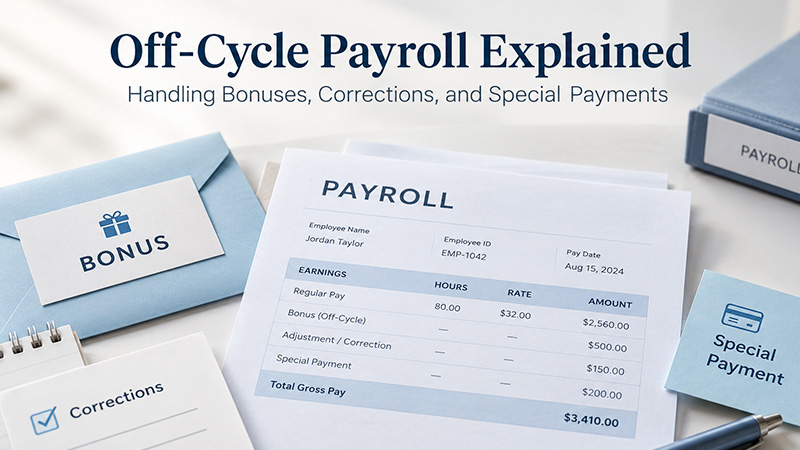
Off-cycle payroll is an additional payroll run processed outside an employer's normal pay schedule. Businesses typically use it for bonuses, corrections, final payments, special payments, or missed payroll items. Exactly how it works depends on the employer's pay practices and the payroll system they use.
It sits alongside your regular schedule rather than replacing it, so your normal paydays stay the same.
Regular Payroll vs. Off-Cycle Payroll
Regular payroll is the scheduled run that follows your normal pay cycle. An off-cycle payroll run is an additional run made outside that schedule to handle a specific payment or correction.
|
|
Regular Payroll |
Off-Cycle Payroll |
|
Timing |
Follows normal payroll schedule |
Happens outside normal schedule |
|
Purpose |
Pays regular wages |
Handles special or exceptional payments |
|
Examples |
Regular salary or hourly wages |
Bonus, correction, special payment |
|
Frequency |
Recurring |
Occasional |
|
Planning |
Usually scheduled in advance |
Often triggered by a specific need |
When Should You Run an Off-Cycle Payroll?
An additional payroll run can help in situations like these. It isn't required for every one of them.
Bonuses
An employee needs a bonus outside the normal pay cycle.
Payroll Corrections
An employee was underpaid, or a payroll item was missed.
Missed Payments
A payment was accidentally left out of a regular payroll run.
Final or Special Payments
A business needs to issue a payment outside its normal schedule, where applicable. State rules on final pay timing vary, so check yours.
Other Exceptional Situations
Individual payroll systems may support other uses. Check what yours allows.
Often there's another option, such as adding the item to the next regular run. The right choice depends on your pay schedule, your payroll system, and any state deadlines.
How Does Off-Cycle Payroll Work?
Identify the payment → Confirm the reason → Verify employee and pay information → Calculate taxes and deductions → Review the payroll → Process payment → Record the transaction
You work out what is owed and why, check the details, apply the right tax treatment, then review, pay, and record it. Verify the payment before you process it. An off-cycle run creates its own payroll records and tax calculations, so a mistake adds cleanup instead of removing it.
How to Process Off-Cycle Payroll
- Identify why the run is needed. Bonus, correction, missed payment, or another special payment.
- Determine the amount. Verify the payment and, for a correction, exactly what was wrong.
- Check payroll taxes and deductions. Decide how the payment is treated under applicable payroll rules.
- Review employee information. Confirm the right employee, pay details, and payment method.
- Run payroll. Process the additional run in your payroll system.
- Review the results. Check gross pay, withholding, deductions, employer taxes, and net pay.
- Keep records. Retain payroll information as required. The IRS says employment tax records should be kept for at least four years.
Can Bonuses Be Paid Through Off-Cycle Payroll?
Can Bonuses Be Paid Through Off-Cycle Payroll?
For federal income tax withholding, bonuses are generally supplemental wages. Under 2026 IRS Publication 15, you may withhold a flat 22% when the bonus is paid or identified separately from regular wages, as long as income tax was withheld from the employee's regular wages in the current or prior year. You can also use the aggregate method, which combines the bonus with regular wages. Withholding on supplemental wages above $1 million in a calendar year is 37% on the excess. Social security and Medicare taxes still apply, and state rules may differ.
Withholding isn't the employee's final tax bill. The 22% is a withholding method, and the actual tax owed is settled on their return. No single rate applies to every bonus.
How Do You Correct a Payroll Error?
The right fix depends on what went wrong, whether the employee was underpaid or overpaid, whether taxes were already calculated or deposited, whether the payroll period has closed, and the federal and state rules involved.
An off-cycle run can be one way to correct an underpayment or missed payment, but it isn't automatically right for every payroll error. Overpayments, for example, raise different questions about recovering money and adjusting tax records. Review your payroll records and tax requirements first, and consider asking a payroll professional if taxes were already reported or deposited.
Are Off-Cycle Payroll Payments Taxed Differently?
Not by itself. An off-cycle payment doesn't create a separate federal tax category. Tax treatment depends on what the payment actually is.
- Regular wages follow the employee's Form W-4 and IRS withholding tables.
- Bonuses and certain other supplemental wages can use the supplemental withholding rules above.
- Taxable benefits and back pay are generally wages, with their own payroll tax treatment.
- Corrections are taxed according to what they correct.
For 2026, Publication 15 lists social security tax at 6.2% each for employer and employee on wages up to $184,500, and Medicare tax at 1.45% each with no wage base limit.
Does Off-Cycle Payroll Cost Extra?
That depends on your payroll provider. Some include additional runs in a plan, some charge per payroll run, and some add processing fees or limit off-cycle payments to certain plans. It isn't always free, and it doesn't always cost extra. Check pricing before you need one. For PayProNext's current plans and fees, see the pricing page.
Can Payroll Software Process Off-Cycle Payments?
Some platforms support additional runs, but functionality varies. When comparing off-cycle payroll software, check whether it supports:
- Additional payroll runs and bonus payments
- Payroll corrections and tax calculations
- Direct deposit and employee payment records
- Payroll reports and tax filing or payment workflows
No product handles all of these the same way, so confirm before you rely on one.
How PayProNext Can Help With Payroll
Payroll Made Simple. PayProNext is cloud-based payroll software for U.S. small businesses. Its payroll services include payroll calculation, direct deposit, an employee and contractor portal, payroll reports, multi-state payroll, and automated federal payroll tax filing on the Full Service plan. PayProNext also describes AI-powered error detection that flags inconsistencies before processing. If you expect to need additional runs for bonuses or corrections, ask the team through the contact page how your plan handles them.
Off-Cycle Payroll Checklist
- Identify why the additional payroll run is needed
- Confirm the employee and payment amount
- Determine applicable taxes and deductions
- Check whether the payment is regular or supplemental wages
- Review the payroll calculation
- Confirm payment details
- Process the payment
- Verify payroll records
- Check applicable tax reporting and deposit requirements
- Keep supporting records
Conclusion
Off-cycle payroll is useful when you need to make a payment or correction outside your normal payroll schedule. Each additional run still deserves a careful look at the amount, taxes, deductions, and records. Good payroll software makes that review easier by keeping calculations, payment details, and records in one place. That's the idea behind Payroll Made Simple.
FAQs
What is off-cycle payroll?
An extra payroll run made between regular paydays, usually to pay something that wasn't in the scheduled run, like a bonus, a correction, or a special payment. Your payroll system and pay practices determine exactly how and when you can use one.
When should you run an off-cycle payroll?
Consider one when a payment shouldn't wait for the next regular payday, such as a bonus, an underpayment, or an item missed in the last run. It isn't always required. Adding the payment to the next regular payroll may be an option.
How does off-cycle payroll work?
You identify the payment, confirm the reason, verify details, calculate taxes and deductions, review the results, process the run, and record it. The payment is paid and recorded separately from your regular run, so accuracy checks matter just as much.
Can bonuses be paid through off-cycle payroll?
Yes, when your payroll process supports it. Bonuses are generally supplemental wages for federal income tax withholding, so IRS supplemental wage rules apply, along with social security and Medicare taxes. State rules may also apply. The method affects withholding, not the employee's final tax.
How do you correct a payroll error?
Start by finding out what went wrong and whether taxes were already calculated or deposited. An off-cycle run can fix an underpayment or missed payment, but it isn't the right fix for every error. Review your records and tax requirements first.
Are off-cycle payroll payments taxed differently?
Not by themselves. The off-cycle label doesn't create a separate federal tax category. The payment's type decides its treatment: a bonus follows supplemental wage rules, while back pay follows the rules for the wages involved. State and local rules may also apply.
Does off-cycle payroll cost extra?
It depends on your provider. Some include additional runs, others charge per run or add processing fees, and some limit certain payments to specific plans. Don't assume it's free or that it always costs extra. Check your provider's pricing before you run one.
Can payroll software process off-cycle payments?
Many platforms can, but capabilities vary. Look for support for additional runs, bonus payments, corrections, tax calculations, direct deposit, and payment records. Features can differ by product and plan. If it isn't clearly listed, ask the provider before relying on it for an urgent payment.
What is the difference between regular and off-cycle payroll?
Regular payroll is recurring and scheduled, and it pays regular wages. Off-cycle payroll is occasional and usually triggered by a specific need, such as a bonus or correction. Tax rules depend on the payment type, not on which run you use.