
How to Set Up a Payroll Process for a Growing Business
Date Released
08 July, 2026
Growth is exciting: new hires, new revenue, new momentum. But growth also means your old, informal way of "handling payroll" won't cut it anymore. Whether you've been running payroll from a spreadsheet or you're hiring your first employee,
This guide walks you through exactly how to build a payroll process that scales with your business, stays compliant, and doesn't eat up your week.
Why Your Payroll Process Needs to Evolve as You Grow
When a business has two or three employees, payroll can feel manageable even without a formal system. But once you cross into five, ten, twenty-five employees or start hiring across state lines, the cracks start to show. Missed tax deadlines, misclassified workers, and manual errors become far more costly, both in dollars and in employee trust.
A well-designed payroll process protects you from compliance risk, keeps your team paid accurately and on time, and frees up hours you can reinvest in running the business. Below is a step-by-step payroll setup guide for employers who are ready to build (or rebuild) their payroll process the right way.
Step-by-Step: How to Set Up Payroll for a Growing Business
1. Get Your Employer Identification Number (EIN) and State Accounts in Order
Before you process a single paycheck, you need the right tax IDs. This includes your federal Employer Identification Number (EIN) from the IRS, along with state and local tax withholding accounts and, in most states, an unemployment insurance (SUTA) account. If you're expanding into new states as you hire remote employees, you'll need to register in each new state, a step many growing companies overlook until a penalty notice arrives.
2. Choose Your Payroll Schedule
Your payroll schedule (weekly, biweekly, semi-monthly, or monthly) affects cash flow, employee satisfaction, and administrative workload. Biweekly is the most common choice for small and mid-sized businesses because it balances predictable cash flow with manageable processing frequency. Some states also have legal requirements around minimum pay frequency, so check your state's wage and hour laws before finalizing your payroll calendar.
3. Classify Employees and Contractors Correctly
Employee classification is one of the most common and most expensive payroll mistakes growing businesses make. Misclassifying a W-2 employee as a 1099 contractor can trigger back taxes, penalties, and audits. As you scale, take time to properly classify each worker as an exempt employee, non-exempt employee, or independent contractor based on IRS and Department of Labor guidelines, not just convenience.
4. Build a Standardized Employee Onboarding Process
Every new hire should move through the same payroll onboarding steps: completing Form W-4, providing I-9 employment eligibility documentation, setting up direct deposit, and reviewing benefit and PTO policies. Standardizing employee onboarding reduces errors, speeds up first-paycheck processing, and creates a consistent employee record for every person on your team.
5. Set Up Payroll Tax Withholding and Deductions
Your payroll process needs to accurately calculate federal income tax withholding, Social Security and Medicare (FICA), state income tax where applicable, and any local taxes. On top of taxes, you'll also manage payroll deductions such as health insurance premiums, retirement contributions, and wage garnishments. Getting this right from day one prevents costly corrections down the road.
6. Choose the Right Payroll Software or Payroll Partner
Manual payroll processing (spreadsheets, paper checks) works for a handful of employees, but it doesn't scale. Cloud payroll software or a payroll outsourcing partner can automate tax calculations, direct deposit, payroll reports, and compliance updates all in one place. Look for a payroll system that integrates with your HR and accounting software, since HR integration and accounting integration cut down on duplicate data entry and reconciliation headaches.
7. Establish a Payroll Approval Workflow
As your team grows, payroll should never run on autopilot without a review step. Build in a payroll approval workflow where a manager or HR lead verifies hours, overtime, PTO usage, and new deductions before each payroll run is finalized. This single step catches the majority of payroll errors before they reach an employee's paycheck.
8. Keep Accurate Payroll Records
Employers are required to maintain payroll records, including the payroll register, timesheets, tax filings, and employee records for several years, depending on federal and state requirements. These records are essential not just for compliance, but for defending your business in the event of a payroll audit.
9. Run Regular Payroll Audits
Even with a solid system in place, periodic payroll audits help you catch classification errors, outdated tax rates, or duplicate entries before they become larger problems. A quarterly audit of your payroll register against your accounting records is a simple habit that prevents expensive year-end surprises.
10. Automate What You Can
As your headcount grows, automation becomes less of a luxury and more of a necessity. Payroll automation software can handle recurring calculations, tax filings, direct deposit, and payroll reports automatically, reducing the administrative burden on your team and minimizing the risk of manual error.
A Real-World Scenario: Scaling from 8 to 35 Employees
Consider a logistics company that started with eight employees on a single spreadsheet. As the company grew to 35 employees across three states, the owner was spending nearly ten hours a week manually calculating overtime, tracking PTO, and filing multi-state payroll taxes. After implementing a structured payroll process including standardized onboarding, an approval workflow, and cloud payroll software with HR integration, the same payroll cycle took under two hours, and the business avoided a multi-state tax filing penalty they had previously narrowly missed.
This is a common story. The businesses that scale smoothly are rarely the ones with the fewest employees; they're the ones with the most reliable payroll process.
Payroll Best Practices for Expanding Companies
- Separate payroll duties across at least two people when possible, to reduce error and fraud risk
- Reconcile your payroll register against your general ledger every pay period
- Stay current on wage and hour laws in every state where you have employees
- Review overtime calculations carefully, especially for non-exempt employees with variable schedules
- Keep PTO accrual policies documented and consistently applied
- Revisit your payroll software or provider annually to confirm it still fits your headcount and complexity
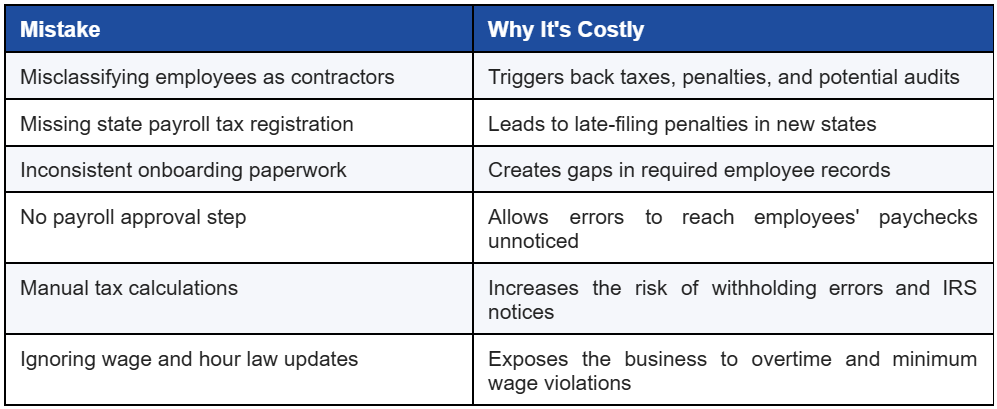
Common Payroll Setup Mistakes to Avoid
Even well-intentioned employers run into avoidable payroll problems. Watch for these:
Frequently Asked Questions
How do I set up payroll for my business?
Start by obtaining your EIN and any required state tax accounts, choosing a payroll schedule, classifying your employees correctly, and selecting a payroll system or provider that can calculate withholding, process direct deposit, and generate payroll reports.
What are the steps in the payroll process?
The core payroll process includes tracking hours worked, calculating gross pay, applying tax withholding and deductions, approving the payroll run, processing direct deposit or checks, and filing the associated payroll taxes.
What payroll records should employers keep?
Employers should retain payroll registers, timesheets, tax filings, W-4 and I-9 forms, and records of deductions and benefits generally for at least three to four years, depending on federal and state requirements.
How often should payroll be processed?
Most growing businesses use a biweekly or semi-monthly schedule, though this depends on state law, cash flow needs, and industry norms. Whatever schedule you choose, consistency is key to employee trust and compliance.
What payroll software is best for growing businesses?
The best payroll software for a growing business is one that scales with your headcount, integrates with your HR and accounting systems, automates tax filings, and supports multi-state compliance as you expand.
How can payroll automation improve efficiency?
Payroll automation reduces manual data entry, minimizes calculation errors, speeds up processing time, and ensures tax filings and payroll reports are generated consistently and on schedule.
What mistakes should employers avoid when setting up payroll?
The most common mistakes are misclassifying workers, skipping state tax registration, lacking a payroll approval step, and relying entirely on manual calculations without periodic payroll audits.
| Let PayProNext Handle the Complexity for You Setting up a payroll process that's accurate, compliant, and built to scale takes time most growing businesses don't have. PayProNext combines cloud payroll software with hands-on payroll administration support covering tax setup, employee onboarding, compliance, and reporting so you can focus on growing your business instead of managing spreadsheets. Ready to simplify payroll as you grow? Contact PayPronext today for a free payroll consultation and see how much time (and risk) you can take off your plate. |