When Payroll Data Doesn’t Match Accounting Records: Five Causes to Investigate
Date Released
13 October, 2026
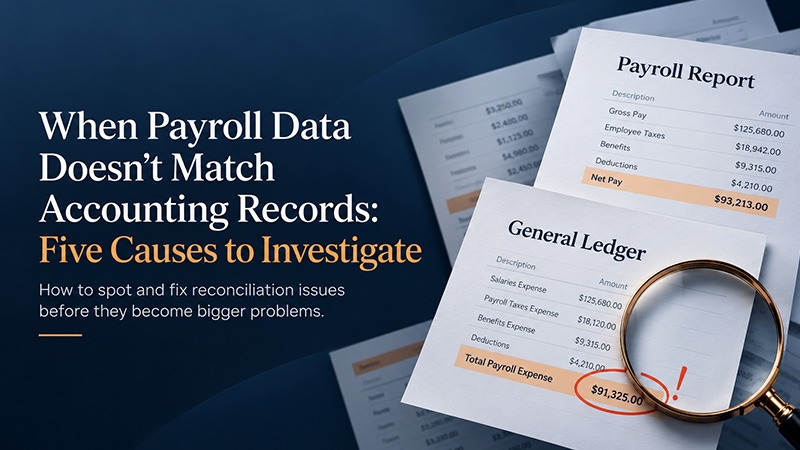
Payroll ran on Friday. Employees were paid, the payroll register looks clean, and the bank deposit matches. Then the bookkeeper opens the general ledger and finds that payroll expense, or the payroll tax liability, is a different number than the payroll reports show.
That gap deserves attention before the books are finalized. Unresolved differences can distort month-end financial statements, hide an understated or overstated tax liability, and push managers toward decisions based on inaccurate labor costs. Many gaps turn out to be timing differences rather than mistakes, and payroll reconciliation is how you tell which is which: comparing payroll reports with accounting records and explaining every difference. Below are five reasons payroll does not match accounting records, plus a workflow for resolving each one.
What Is Payroll Reconciliation?
Payroll reconciliation is the process of comparing payroll reports with the general ledger, journal entries, related liability balances, and payment records, then explaining each difference. It goes beyond checking that the direct deposit total matches the bank statement. Cash leaving the account doesn’t prove that wages, employer taxes, withholdings, and benefit deductions landed in the right accounts and periods. The work also supports tax compliance: IRS Publication 15 lists reconciling quarterly Forms 941 with Forms W-2 and W-3 among an employer’s annual responsibilities.
Five Reasons Payroll Does Not Match Accounting Records
Each cause below is labeled as a likely error, timing difference, or classification issue, because the right response differs for each.
1. Payroll Expenses and Payroll Liabilities Are Being Confused
What creates it: Gross wages and employer payroll taxes are employer costs. Employee withholdings, such as income tax, employee Social Security and Medicare, and benefit deductions, come out of gross wages and generally sit in liability accounts until remitted. Net pay is what the employee receives. The IRS calls withheld taxes part of employees’ wages that employers pay over to the Treasury, which is why they are known as trust fund taxes. Exact entries depend on your payroll setup and accounting method, so not every payroll-related amount belongs in one expense account.
Example (illustrative): Gross wages are $10,000. Withholdings are $1,200 in federal income tax, $765 in employee Social Security and Medicare, and a $300 benefit deduction, so net pay is $7,735 ($10,000 − $1,200 − $765 − $300). The employer’s share of Social Security and Medicare adds $765, making wage and payroll tax expense $10,765 before other costs. Booking only the $7,735 net pay as expense would understate it by $3,030.
Investigate: Compare the payroll register with wage expense, employer tax expense, and each liability account. Likely type: classification issue.
2. Payroll Dates and Accounting Periods Do Not Line Up
What creates it: Pay periods, pay dates, processing dates, and month-end or year-end cutoffs can fall on different days. Example: Employees earn wages through March 31 but are paid April 3. Under accrual accounting, those wages and related employer costs may need to be recognized in March, subject to the company’s accounting policies, while a cash-basis business may record them in April. IRS Publication 538 explains how the two methods time expenses differently. Investigate: Compare pay-period dates, pay dates, and the cutoff, and look for accrual entries and reversals. At year-end, check that the same wages aren’t counted in both years. Likely type: timing difference. It is not proof that payroll was processed incorrectly.
3. Payroll Journal Entries Are Missing, Duplicated, or Posted Incorrectly
What creates it: Manual journal entries, repeated imports, failed integrations, incorrect posting dates, and payroll runs that were processed but never transferred. A missing entry can make payroll reports look correct while the general ledger stays incomplete. Example: An import fails on the second payroll of the month, so the ledger shows one run while the register shows two. Investigate: List every payroll run by check date, match each to a ledger entry, and scan for duplicates with the same amount and date. Also confirm the posting date matches the pay period or pay date your policy calls for. Likely type: genuine error.
4. Payroll Categories or General Ledger Accounts Are Mapped Incorrectly
What creates it: Wages, overtime, bonuses, employer payroll taxes, benefits, reimbursements, and department-level labor costs can be assigned to the wrong accounts or departments. Total payroll may look nearly right while individual categories disagree. Chart-of-accounts structures vary by business, so check against your own. Example: Reimbursements paid under an accountable plan generally aren’t wages, so posting them to wage expense overstates wages. Likewise, overtime lumped into regular wages can leave the total right but the category wrong. Investigate: Compare earning and deduction codes in the payroll summary with the account-mapping table, then review department allocations. Likely type: classification issue.
5. Adjustments, Reversals, or Tax Liabilities Have Not Been Fully Reflected
What creates it: Voided or reissued checks, off-cycle payroll, retroactive pay, corrections, employer tax adjustments, benefit changes, and liability payments recorded in different periods. Back pay, for instance, is generally taxed as wages in the year paid. Example: A tax deposit clears the bank on the first business day of the next month, so the liability account still carries a balance at month-end. A payroll report, bank transaction, tax liability account, and ledger balance may legitimately differ at any given moment. Investigate: Gather adjustment reports, voided-check lists, and deposit confirmations, and trace each item. Likely type: timing difference or genuine error, depending on what you find.
How to Reconcile Payroll With Accounting Records
- Choose the payroll period and accounting cutoff.
- Gather payroll registers, payroll summaries, journal entries, general ledger detail, tax liability reports, and relevant bank records.
- Compare gross wages, employer payroll taxes, deductions, benefits, net pay, and other payroll-related costs.
- Trace differences to their source rather than forcing balances to match.
- Check account mappings, duplicate entries, missing imports, and timing differences.
- Correct verified errors through the appropriate payroll or accounting process.
- Document the resolution and confirm that updated balances agree.
Preserve the audit trail. Avoid changing accounting entries simply to make a reconciliation balance; an unexplained plug hides the real cause and weakens your records. Retention matters too: the IRS says to keep employment tax records for at least four years, and the Department of Labor’s FLSA fact sheet says covered employers must preserve payroll records for at least three. State rules may differ.
Payroll Reconciliation vs. Bank Reconciliation
Bank reconciliation primarily compares recorded cash activity with bank activity. Payroll reconciliation examines payroll calculations, payroll-related expenses, liabilities, accounting entries, and payments. The two overlap wherever payroll touches cash, such as net pay withdrawals and tax payments. But a successful bank reconciliation doesn’t prove payroll was recorded correctly. A payroll can be paid in the right amount, clear the bank, and still be posted to the wrong accounts, in the wrong period, or left out of the tax liability balance.
Can Payroll Software With Accounting Integration Reduce Mismatches?
It can help. Reliable payroll reports, consistent data transfer, and clear payroll records reduce manual re-keying and some avoidable posting errors. A well-configured connection gives bookkeepers a consistent starting point.
It doesn’t remove the need for review, though. Incorrect account mappings, duplicate imports, incomplete setup, timing differences, and human review failures can still create discrepancies, and an integration doesn’t guarantee accurate books. Treat payroll software with accounting integration as a way to reduce risk, not as a substitute for reconciliation.
PayProNext is a payroll management option for U.S. small businesses that want organized payroll records. Because accounting connections vary by product and plan, check PayProNext’s current documentation for supported accounting platforms or export options before building your workflow around one.
How Often Should Small Businesses Reconcile Payroll?
A sensible routine is a quick review after each payroll run, a formal review during the monthly close, and additional checks at quarter-end and year-end, when tax returns and wage statements are prepared. The right frequency depends on payroll frequency, business complexity, accounting policies, and compliance needs. This is a practical suggestion, not a universal legal requirement.
Frequently Asked Questions About Payroll Reconciliation
Why doesn’t payroll match the
general ledger?
Usually because of timing, classification, or posting issues rather than a calculation error. Payroll reports show what was processed, while the ledger shows what was entered, mapped, and dated. Missing or duplicated entries, incorrect mappings, accrual cutoffs, and unrecorded adjustments are common culprits. Trace each difference to its source before correcting anything.
What causes payroll accounting
discrepancies?
Common causes include confusing expenses with liabilities, pay dates that fall in a different accounting period, missing or duplicate journal entries, incorrect account mapping, and unreflected adjustments such as voided checks, off-cycle payroll, or tax liability payments. Some are timing differences that resolve themselves; others need correction.
How do you reconcile payroll with
accounting records?
Select the period and cutoff, gather payroll reports, ledger detail, tax liability reports, and bank records, then compare gross wages, employer taxes, deductions, benefits, and net pay. Trace differences to their source, correct verified errors through the proper process, and document the resolution. Never force balances to match.
What is the difference between
payroll reconciliation and bank reconciliation?
Bank reconciliation matches recorded cash to bank activity. Payroll reconciliation checks payroll calculations, expenses, liabilities, journal entries, and payments against payroll reports. Both involve payroll cash, but a balanced bank account doesn’t confirm that wages, taxes, and withholdings were recorded in the correct accounts and periods.
How often should small businesses
reconcile payroll?
A common approach is a quick check after each payroll run, a formal review at monthly close, and added checks at quarter-end and year-end. The best schedule depends on payroll frequency, business complexity, accounting policies, and compliance needs. It is good practice, not a universal legal requirement.
Can payroll software prevent
accounting mismatches?
It can prevent some, mainly by limiting manual data entry and standardizing payroll reports. It can’t prevent all of them. Incorrect account mappings, duplicate imports, incomplete setup, timing differences, and skipped reviews still cause discrepancies, so regular payroll reconciliation remains necessary.
Conclusion
When payroll data doesn’t match accounting records, the goal isn’t to make the numbers agree quickly. It’s to trace each difference to its source, classify it as an error, timing difference, or classification issue, and document the outcome. Consistent payroll reconciliation turns month-end surprises into routine checks. Explore PayProNext to simplify payroll management and keep payroll information organized as your business grows.