
What Is a Payroll Register? How Small Businesses Can Use It to Track Wages and Taxes
Date Released
05 November, 2026
Every payroll run leaves behind a trail of numbers: hours worked, gross wages, tax withholdings, benefit deductions, and the net pay that reaches each employee. For a small business without a payroll department, keeping that trail organized can mean the difference between a quick review and a scramble through scattered files. A payroll register pulls those details into one record you can check after every run. It supports accurate bookkeeping and makes payroll questions easier to answer. This guide explains what a payroll register is, what it includes, how to build one, and how long to keep payroll records.
|
Quick Answer A payroll register is a report that lists every employee’s pay for a single pay period, including hours, gross wages, tax withholdings, deductions, and net pay. Small businesses use it to review each payroll run, check totals before or after payment, and keep organized records for bookkeeping. |
What Is a Payroll Register?
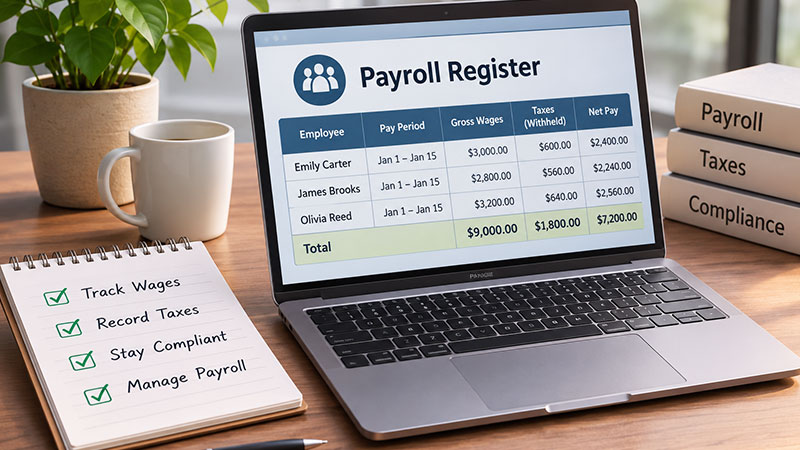
A payroll register is a period-specific summary of employee compensation that shows how each paycheck was calculated, from gross wages through taxes and deductions to net pay. It works as an internal record of a payroll run, giving owners a single document to review, reconcile, and reference later.
Its main job is review. After each payroll run, you can confirm that earnings look right, that withholdings and deductions were applied as expected, and that net pay matches the payments you issued. When a question comes up later, such as why a paycheck changed, the register is often the fastest place to look. It also gives your bookkeeper a clean source for recording payroll expenses.
What Information Does a Payroll Register Contain?
Layouts vary, but most registers include these fields:
- Employee name or identification number
- Pay period and payment date
- Regular and overtime hours
- Hourly rate or salary
- Gross wages
- Federal, state, and local tax withholdings, where applicable
- Social Security and Medicare deductions
- Benefits and other deductions
- Employer payroll tax amounts
- Net pay
Treat this list as a starting point. The exact fields depend on your business, your payroll setup, and the requirements that apply to you. Employer payroll taxes deserve special care. They are costs the business owes on top of wages, not amounts taken from an employee’s paycheck, so many registers show them in a separate column or section. IRS Publication 15 (Employer’s Tax Guide) explains employers’ federal employment tax responsibilities.
Sample Payroll Register
The table below shows a simplified register for one pay period with two fictional employees. The figures are illustrative only. They are not an actual tax calculation, a universal deduction formula, or tax advice.
|
Employee |
Gross Pay |
Tax Withholdings |
Other Deductions |
Net Pay |
|
Jordan Ellis (sample) |
$1,800.00 |
$310.00 |
$75.00 |
$1,415.00 |
|
Maya Patel (sample) |
$2,400.00 |
$455.00 |
$120.00 |
$1,825.00 |
|
Totals |
$4,200.00 |
$765.00 |
$195.00 |
$3,240.00 |
Illustrative
figures for a fictional pay period. Employer payroll taxes are recorded
separately.
The totals row makes reconciliation easier. Total net pay should match the payments you issued, and total withholdings should line up with the related liabilities in your accounting records.
How to Create a Payroll Register for a Small Business
Whether you use a spreadsheet or payroll software, the process follows the same eight steps:
- Collect employee and pay-period information. Confirm names or IDs, pay rates, the pay period, and the payment date.
- Record hours worked, overtime, or salary. Use time records for hourly staff and agreed pay for salaried employees.
- Calculate gross wages. Combine regular pay, overtime, and other earnings for the period.
- Apply employee withholdings and deductions. Include applicable taxes, Social Security and Medicare, benefits, and other deductions.
- Record employer payroll tax obligations separately. Keep them apart from employee withholdings.
- Calculate net pay. Subtract withholdings and deductions from gross wages.
- Review totals and reconcile payments. Compare register totals with payments issued and your accounting records.
- Save the register securely. Use restricted access and consistent file names so records are easy to retrieve.
Spreadsheets can work for very small teams, but manual calculations leave more room for error as headcount grows. If you are comparing payroll software with payroll register-style records, ask what reports the platform provides for each run and how easily you can review them.
Payroll Register vs. Payroll Journal
The two records are often confused, but they serve different purposes. A payroll register provides employee-level details for a specific pay period: hours, earnings, withholdings, deductions, and net pay for each person. A payroll journal records payroll transactions in your accounting system, including wages expense, payroll liabilities, benefits, and cash.
Put simply, the register explains what happened in each paycheck, while the journal shows how the payroll run affects your books. They support each other, since register totals help confirm the journal entry is accurate, but they are not interchangeable.
How Often Should a Payroll Register Be Updated?
Prepare or update the register for every payroll run, whether you pay weekly, biweekly, semimonthly, or monthly. A register tied to each pay date creates a consistent record and makes errors easier to catch while they are still simple to fix.
How Long Should Small Businesses Keep Payroll Records?
Retention rules come from more than one source, so it helps to keep them separate.
IRS Employment Tax Records
The IRS says employers should keep all employment tax records for at least four years. See the IRS recordkeeping guidance for details.
FLSA Payroll Records (Department of Labor)
Separately, the Fair Labor Standards Act requires covered employers to keep payroll records for at least three years. Records used to calculate wages, such as time cards and wage-rate tables, generally must be kept for at least two years. These are Department of Labor rules, distinct from the IRS requirement.
State and Other Requirements
State or local laws, or other obligations, may require longer retention. A practical approach is to follow the longest period that applies to you and confirm details with your state labor agency or accountant.
Frequently Asked Questions
What is a payroll register used for?
It helps you review each payroll run, confirm that wages, withholdings, deductions, and net pay look right, and keep an organized record for bookkeeping and reconciliation.
What information does a payroll register contain?
Typically employee identifiers, pay period and payment date, hours, pay rate, gross wages, tax withholdings, other deductions, employer payroll taxes, and net pay. Exact fields vary by business.
How do you create a payroll register?
Gather employee and pay-period data, record hours or salary, calculate gross wages, apply withholdings and deductions, record employer taxes separately, calculate net pay, reconcile totals, and save the file securely.
Is a payroll register the same as a payroll journal?
No. A register details each employee’s pay for a period, while a journal records the resulting payroll transactions in your accounting system. The two complement each other.
Is a payroll register required by the IRS?
Employers must maintain specified employment tax records, but the IRS does not prescribe one universal document format called a payroll register. A register is a practical way to organize those details.
How often should a payroll register be updated?
Prepare or update it for every payroll run, whether you pay weekly, biweekly, semimonthly, or monthly.
How long should small businesses keep payroll records?
At least four years for IRS employment tax records, at least three years for FLSA payroll records, and at least two years for wage-calculation records. State rules may require longer.
Simplify Payroll Recordkeeping with PayProNext
A well-kept payroll register makes every pay period easier to review, and the right tools can reduce the manual work behind it. PayProNext is a payroll solution for small businesses, built around the idea of Payroll Made Simple. It supports payroll calculations and processing, keeps employee payroll information organized, and provides payroll reports and records that help you review wages and deductions. Plan details matter: Basic Payroll calculates payroll but does not provide direct deposit, while Full Service Payroll supports direct deposit.
|
Make Every Payroll Run Easier to Review. Keeping track of wages, deductions, and payroll records doesn’t have to become another administrative burden. Explore PayProNext to see how its payroll solution can help simplify your payroll process. Visit PayProNext or request a demo to learn more. |