
What Is Gross-to-Net Payroll? Understanding Every Step of Employee Pay
Date Released
09 July, 2026
A new hire opens their first paycheck and immediately has questions. The offer letter said $60,000 a year, but the direct deposit is nowhere close to $60,000 divided by 24. Where did the rest of the money go? For business owners and HR teams, that question comes up constantly, and getting the answer wrong or explaining it poorly erodes employee trust and invites costly compliance mistakes.
This is exactly what the gross-to-net payroll calculation explains. It is the step-by-step process that takes an employee’s gross pay and turns it into the net pay that actually lands in their bank account. Understanding this process is not optional for employers; it is the foundation of accurate, compliant, and on-time payroll.
Below, we break down every step of gross-to-net payroll, show a real calculation example, and explain how the right payroll software takes the guesswork out of it entirely.
What Is Gross-to-Net Payroll?
Gross-to-net payroll is the calculation process employers use to convert an employee’s gross wages into their final take-home pay. It accounts for every payroll deduction required by law, along with any voluntary deductions the employee has elected, such as retirement contributions or health insurance premiums.
In simple terms, gross-to-net payroll answers one question for every pay period: after taxes, benefits, and other withholdings, how much does the employee actually keep? Employers who understand this process thoroughly are better equipped to answer employee questions, catch payroll errors before they happen, and stay compliant with federal, state, and local tax law.
What Is Included in Gross Pay?
Gross pay is more than a base hourly rate or salary. A fully accurate payroll calculation must include every taxable component of compensation, such as:
- Regular hourly wages or salary
- Overtime pay for hours worked beyond 40 in a workweek
- Bonuses and incentive pay
- Commissions
- Paid time off, holiday pay, and sick pay
- Taxable fringe benefits
Missing any of these components at the gross pay stage throws off every calculation that follows, including tax withholding and benefit deductions.
Gross Pay vs. Net Pay: What Is the Difference?
Before diving into the calculation steps, it helps to separate two terms that are often used interchangeably but mean very different things.
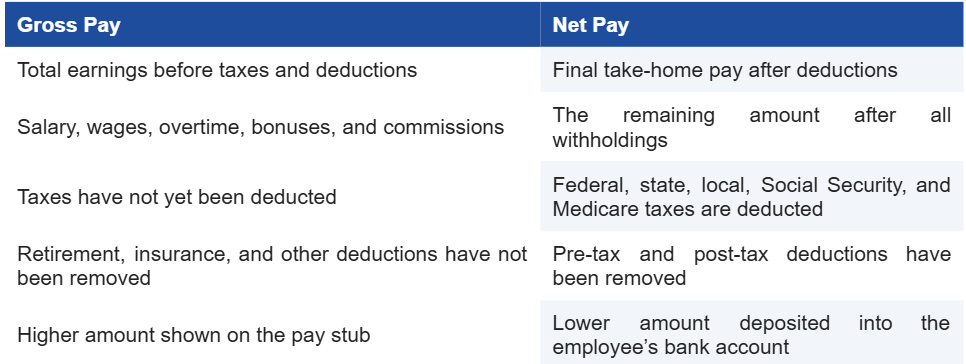
The difference between gross pay and net pay is where most employee confusion and most payroll disputes originate. A clear, consistent gross-to-net process prevents both.
Step-by-Step: How Gross-to-Net Payroll Calculation Works
While every employee’s situation is a little different, employers follow the same general sequence to move from gross pay to net pay.
- Start with total gross wages. Add up regular pay, overtime, bonuses, and commissions for the pay period.
- Determine taxable wages. Subtract any pre-tax deductions, such as traditional 401(k) contributions or pre-tax health insurance premiums, from gross pay. What remains is the taxable wage base used for income tax withholding.
- Withhold federal income tax. Apply IRS withholding tables based on the employee’s Form W-4 elections, filing status, and taxable wages.
- Withhold FICA taxes. Calculate Social Security tax (6.2% up to the annual wage base) and Medicare tax (1.45%, plus an additional 0.9% for high earners) on applicable wages.
- Withhold state and local income tax. Apply the appropriate state and, where required, city or local tax rates based on the employee’s work and residence location.
- Apply post-tax deductions. Subtract items such as Roth retirement contributions, wage garnishments, or union dues from the remaining amount.
- Calculate final net pay. What remains after every mandatory and voluntary deduction is the employee’s net pay, the amount issued via direct deposit or paycheck.
Payroll Deductions Explained
Every payroll deduction falls into one of a few categories. Understanding these categories helps employers apply them in the correct order and avoid compliance mistakes.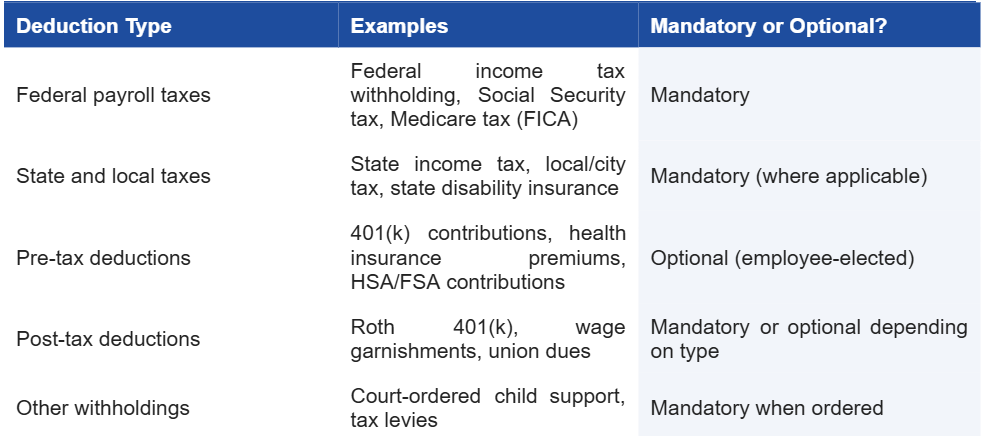
Getting the order of operations right matters: pre-tax deductions must be subtracted before calculating income tax withholding, while post-tax deductions are subtracted only after taxes have already been withheld. A payroll calculation that applies deductions out of order will produce an incorrect net pay figure and inaccurate tax withholding.
Gross-to-Net Payroll Example
Here is a simplified example for a biweekly-paid employee earning $2,500 in gross wages, contributing 5% to a pre-tax 401(k), and paying a fixed health insurance premium.
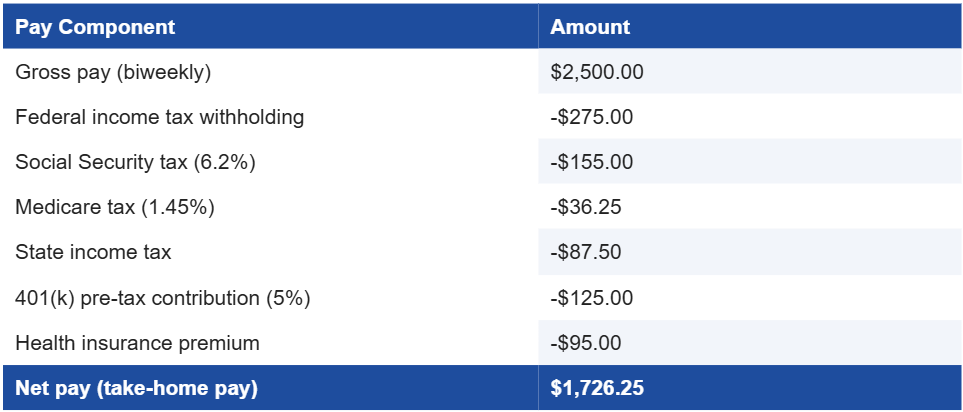
In this example, the employee’s $2,500 gross paycheck becomes $1,726.25 in net pay once federal, state, and FICA taxes, along with pre-tax benefit deductions, are applied. Multiply the gap between those two numbers across every employee and every pay period, and it becomes clear why payroll accuracy carries real financial weight for both employers and employees.
Common Gross-to-Net Payroll Mistakes to Watch For
Even experienced payroll teams run into errors. Before finalizing any pay run, check for these common red flags.
- Pre-tax deductions are applied after tax withholding instead of before
- Outdated W-4 information used for federal withholding
- Incorrect state assigned for remote or multi-state employees
- Overtime pay is miscalculated or omitted from gross wages
- Social Security tax withheld past the annual wage base limit
- Garnishment or child support orders applied incorrectly or out of order
- Benefit deduction amounts are not updated after open enrollment changes
A single missed step in this checklist can lead to underpaid taxes, IRS penalties, or an employee receiving the wrong paycheck, all of which are far more costly to fix after the fact than to prevent up front.
Why Gross-to-Net Accuracy Matters for Employers
Accurate gross-to-net payroll calculation is not just about employee satisfaction, though that matters too. Employers carry legal responsibility for correctly withholding and remitting federal, state, and FICA taxes. Underwithholding can trigger IRS penalties and interest, while overwithholding creates cash flow issues and employee complaints. Consistent, accurate payroll also builds trust: employees who understand and see correct pay stubs are less likely to raise disputes or lose confidence in their employer.
This is precisely why so many small and mid-sized businesses move away from manual spreadsheets and toward dedicated payroll management software. Manual gross-to-net calculations require constant attention to changing tax tables, wage base limits, and benefit elections. A single overlooked update can cascade into errors across an entire pay run.
How Payroll Software Simplifies Gross-to-Net Calculations
This is where payroll automation software like PayProNext changes the equation for employers. Instead of manually tracking IRS withholding tables, state tax rate changes, and FICA wage base limits, PayProNext’s payroll calculation engine applies them automatically for every employee, every pay period.
- Automatic payroll calculations for gross pay, deductions, and net pay, updated as tax rules change
- Built-in payroll compliance software features that flag missing W-4 data or wage base limits before a pay run is finalized
- Support for pre-tax and post-tax deductions, including retirement contributions and health insurance premiums
- Multi-state payroll processing for remote and distributed teams
- Direct deposit, digital pay stubs, and a complete payroll register for every pay period
- Detailed reporting that makes payroll accuracy easy to verify at a glance
For growing businesses, this level of automation turns gross-to-net payroll from a recurring source of risk into a routine, reliable process. Whether a business is running payroll in-house or considering payroll outsourcing services, having software that handles the calculation accurately every time is the difference between a payroll process that scales and one that creates constant firefighting.
Frequently Asked Questions
How is net pay calculated?
Net pay is calculated by subtracting pre-tax deductions, federal and state income tax, FICA taxes, and post-tax deductions from an employee’s gross pay.
What deductions reduce gross pay?
Common deductions include federal and state income tax, Social Security and Medicare tax, retirement contributions, health insurance premiums, and wage garnishments.
Why is net pay different from gross pay?
Net pay is lower than gross pay because mandatory taxes and any elected benefit deductions are subtracted before an employee receives their paycheck.
How does payroll software calculate employee pay?
Payroll software applies current tax tables, wage base limits, and an employee’s specific deduction elections automatically, calculating gross-to-net pay for every pay run without manual recalculation.
What payroll taxes affect take-home pay?
Federal income tax, state and local income tax, Social Security tax, and Medicare tax all reduce gross pay to arrive at final take-home pay.
Get Gross-to-Net Payroll Right, Every Time
Manually tracking every tax table, wage base limit, and deduction rule is a full-time job on top of running a business. PayProNext’s payroll management software automates gross-to-net calculations from start to finish, so every paycheck is accurate, compliant, and on time.
Ready to stop second-guessing your payroll calculations? Schedule a free demo with PayPronext today and see how automated, accurate payroll can save your business time, reduce compliance risk, and keep your employees paid correctly, every single pay period.