What Happens After You Submit Payroll? A Look Inside the Payroll Processing Cycle
Date Released
06 October, 2026
You've double-checked the hours. You've looked at that one bonus twice. You click Submit, a confirmation pops up, and then you wonder: what happens now?
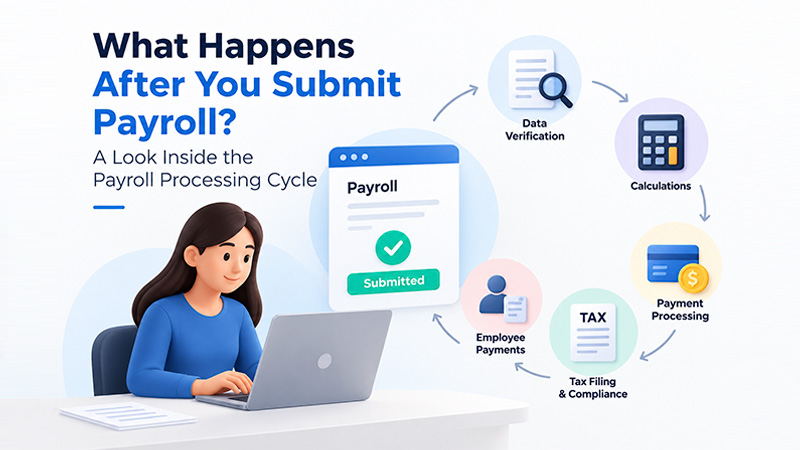
That button feels like the finish line, but it's really a handoff. Behind it, the payroll processing cycle keeps moving. Your data gets checked, wages get calculated, payments get routed, taxes get tracked, and records get updated. Some of it takes minutes. Some of it plays out over weeks. Here's what happens after payroll is submitted, and what still needs your eyes.
What Happens After You Submit Payroll?
Short answer: your payroll provider reviews the data, finalizes the math, processes payment instructions, and updates your records. Employees get paid on the scheduled pay date, and your payroll taxes follow the IRS deposit schedule that applies to your business. None of that has to happen at the same moment.
Most payroll processing steps look something like this:
- Payroll is submitted.
- The data is validated or reviewed.
- Calculations and deductions are finalized.
- Payment instructions are processed.
- Employee payments go out on the scheduled pay date, using the chosen payment method.
- Payroll taxes and liabilities are handled according to the applicable requirements.
- Payroll records and reports are updated.
- Reconciliation and review may follow.
Treat that as a map, not a script. Providers order and automate these steps differently, and your own setup (pay schedule, approval rules, payment method) changes the details.
The Payroll Processing Steps Explained
1. Payroll Submission
Submitting tells your provider this run is ready. The hours, salaries, bonuses, and adjustments you entered become a formal instruction to pay people. Depending on your setup, someone else may need to approve it first.
2. Validation and Review
Many payroll systems look over the data for obvious problems, like missing information or numbers that don't add up. Not every system checks the same things, though, and no automated check replaces a human glance. If something looks off, the run may be flagged or held until it's fixed.
3. Payroll Calculation
This is where the numbers get real. The system works out gross wages, subtracts employee deductions and withholding, and arrives at net pay. It also calculates the employer's side, such as the employer share of Social Security and Medicare taxes. Gross pay is what the employee earned. Net pay is what lands in their account.
4. Payment Processing
Once the run is approved, payment instructions move toward your employees. With direct deposit, your provider sends instructions through the banking system, typically the ACH network, so funds can reach each employee's bank account. Whether that takes a day or several depends on your provider, the banks involved, and the pay date you set.
5. Tax Processing
Payroll taxes have four moving parts: withholding from employee pay, employer-side taxes, deposits to the IRS, and reporting. Here's the piece people miss. Submitting payroll doesn't necessarily mean every tax deposit is made at that moment. Deposits follow IRS rules and your assigned deposit schedule, which we'll get to below.
6. Recordkeeping and Reporting
After payroll runs, the system updates pay stubs, year-to-date totals, and payroll reports. Those records feed later work like quarterly filings and year-end forms.
What Happens After Payroll Is Approved?
Approval generally gives the run permission to move forward. It isn't the same as payment. Think of it as four loose phases: approval authorizes the run, processing handles the calculating and routing, payment is when employees actually receive funds, and post-payroll activities cover everything after, like reports and reconciliation.
Software varies, so these phases don't always show up as separate screens. In some systems approval and submission are one click. Either way, the actual payment timing still comes down to your pay schedule and your provider's and bank's process.
How Long Does Payroll Processing Take?
There's no single number, and anyone who gives you one for every provider is guessing. Processing time depends on:
- Your payroll provider and its rules
- The submission cutoff time
- Your pay schedule and pay date
- Direct deposit or another payment method
- Banking and ACH processing
- Employer review and approval
- Corrections or flagged items
- Weekends and bank holidays
The practical move is to find your provider's cutoff for your intended pay date and submit well ahead of it. Last-minute submissions are where small hiccups turn into late paychecks.
When Do Employees Receive Their Pay After Payroll Is Submitted?
The day you submit and the day employees get paid aren't necessarily the same. Employees are paid based on the scheduled pay date, the cutoff you met, how direct deposit is processed, how quickly the banks move, and the payment method you chose. Submitting early doesn't necessarily mean paying early, and submitting late can mean missing the pay date entirely. For a real timeline, ask your provider for its schedule.
What Happens to Payroll Taxes After Submission?
Payroll taxes get calculated as part of the run, but they don't all head to the IRS the second you click Submit. Here's how the pieces fit.
Federal income tax is withheld from employee pay based on each employee's Form W-4 and IRS withholding methods. Social Security and Medicare taxes are shared between employee and employer. For 2026, that's 6.2% each for Social Security on wages up to $184,500, and 1.45% each for Medicare with no wage cap. Employers also withhold an extra 0.9% Additional Medicare Tax on an employee's wages above $200,000, with no employer match.
Deposit timing is where your schedule matters. According to IRS Notice 931 (Rev. September 2026), federal employment-tax deposits must be made electronically, and most employers deposit on either a monthly or semiweekly schedule based on a lookback period. Monthly depositors deposit taxes on a month's paydays by the 15th of the following month. Semiweekly depositors deposit by Wednesday or Friday, depending on the payday. The IRS also notes that these rules are based on when wages are paid, and a $100,000 next-day rule can override either schedule. Reporting follows on Form 941 each quarter, plus W-2s at year-end.
What Happens If a Payroll Error Is Found After
Submission?
Don't panic, and don't improvise. The right fix depends on what went wrong and how far the payroll has traveled. Incorrect hours, a wrong pay rate, a bad deduction, a missing employee, and wrong bank information each call for a different response.
What matters most is whether the payroll has been processed, whether payment has gone out, what type of error it is, what correction process your provider offers, and whether tax or reporting requirements are affected. Caught early, it may be possible to edit or cancel the run, depending on your provider. After payment, you might need an adjustment in a later run or a separate corrective payment. If taxes were affected, the IRS provides Form 941-X for correcting a previously filed Form 941. Contact your provider quickly.
What Happens During Post-Payroll Processing?
This is the quiet part nobody sees, but it's where good payroll habits live. Common activities include:
- Reviewing payroll reports
- Reconciling payroll totals against what you expected and what your books show
- Confirming payments went through
- Reviewing payroll liabilities, including taxes still waiting to be deposited
- Keeping records organized
- Preparing information for required tax and reporting filings
A quick review right after each run catches small issues before they snowball.
How Payroll Processing Software Helps
Payroll processing software can handle a lot of the cycle described above: payroll calculations, employee records, deductions, tax calculations, payment processing, payroll reports, and recordkeeping. Not every product offers every feature, so the better question is what your business needs. Weigh your workforce size, how you pay people, your tax responsibilities, and how much support you'll want when something goes sideways.
PayProNext is one example. It's a cloud-based payroll platform that offers direct deposit, tax calculations and filing, payroll reports, and W-2 and W-3 filing, and it supports both W-2 employees and 1099 contractors.
Frequently Asked Questions
What happens after you submit
payroll?
Your provider validates the data, finalizes calculations, processes payments for the scheduled pay date, handles tax liabilities under IRS rules, and updates your records. The exact workflow varies by provider.
What happens after payroll is
processed?
Payments move toward employees through the chosen method, tax obligations are tracked for deposit and reporting, and reports and records are updated.
How long does payroll processing
take?
It varies. Your provider, the submission cutoff, your pay schedule, banking processing, approvals, corrections, and weekends or holidays all play a part. Check your provider's cutoff for your pay date.
What happens after payroll is
approved?
Approval authorizes the run to continue. Processing and payment then follow your pay schedule and your provider's and bank's process.
When do employees receive their pay
after payroll is submitted?
On the scheduled pay date, subject to cutoffs and banking timelines. The submission date and the pay date often differ.
What happens to payroll taxes after
submission?
They're calculated and tracked, then deposited electronically on your IRS deposit schedule, monthly or semiweekly for most employers. Quarterly reporting happens on Form 941.
What is a payroll processing cycle?
It's the full sequence from collecting payroll data through calculation, payment, tax handling, recordkeeping, and review, repeated every pay period.
What happens if a payroll error is
found after submission?
It depends on timing and the type of error. Contact your provider promptly. The fix might be an edit before processing, an adjustment or corrective payment afterward, or a tax-form correction.
What happens during post-payroll processing?
Employers and providers review reports, reconcile totals, confirm payments, check liabilities, keep records, and prepare tax and reporting information.
Conclusion
Submitting payroll is one stage in a longer payroll processing cycle. A good run continues through validation, calculation, payment, tax obligations, recordkeeping, and review. Know your provider's cutoffs, know your deposit schedule, and give yourself a few minutes after each run to check the results. That small habit does more for you than the button ever will.