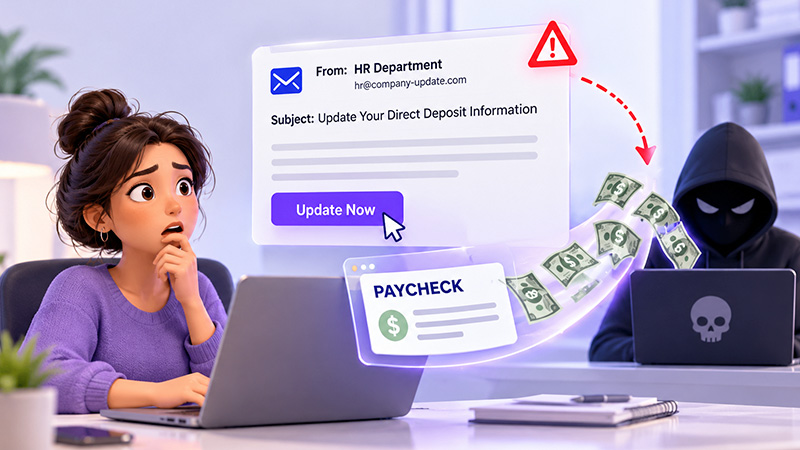
Payroll Diversion Scams in 2026: How a Fake Email Can Redirect an Employee’s Paycheck
Date Released
19 October, 2026
One Fake Email Can Put a Paycheck at Risk
Picture a payroll administrator the afternoon before cutoff. A message appears to come from an employee: “I switched banks. Please update my direct deposit before Friday.” The sender sounds familiar, the deadline is close, and three other requests are waiting. If the change goes through without independent confirmation, the next paycheck could land in an account a fraudster controls. This scenario is illustrative, not a documented case.
Payroll deadlines make these requests more dangerous because busy teams are more likely to skip checks. But payroll diversion scams are not only an email security problem. They can involve impersonation, compromised accounts, social engineering, weak change-verification procedures, or unauthorized access to payroll systems. Stopping them takes a process, not just a spam filter.
What Are Payroll Diversion Scams?
Payroll diversion scams redirect an employee’s pay to an account the criminal controls. Unlike broader payroll fraud, such as falsified hours or ghost employees, the victim is a real employee and the target is real wages. Common forms include:
- Fraudulent direct deposit account-change requests, often through spoofed emails or business email compromise (BEC), where criminals impersonate trusted people.
- Compromised employee email accounts used to send requests that look genuine.
- Fake HR, payroll, or employee messages meant to collect credentials or bank details.
- Unauthorized changes to payroll records or payment instructions.
Not every incident begins with phishing. The FBI has described two distinct patterns: spoofed emails asking HR or payroll to change an employee’s deposit account, and intrusions in which a criminal gains access to an employee’s payroll account and alters the routing directly. In the first, a person is tricked into making the change. In the second, the attacker makes it. Both end with diverted wages, but they call for different controls.
How Fake Emails Redirect Employee Paychecks
The sequence below is a representative pattern, not one every scam follows.
- Reconnaissance: A criminal gathers names, reporting lines, payroll contacts, or pay schedules from public sources or compromised accounts.
- Impersonation or account compromise: The attacker writes from a spoofed address or a genuinely compromised account.
- Urgent request: The message asks payroll to change bank details, often citing a new account or a pressing problem.
- Verification failure: The change is processed without reliable independent confirmation.
- Diversion: The next payment may go to the fraudulent account, which the FBI notes is often a prepaid card.
- Late detection: The employee notices only when wages fail to arrive.
Here is a deliberately brief illustration:
“Hi, I changed banks. Please update my direct deposit before Friday’s payroll. Don’t call, I’m in meetings all day.”
The warning signs are an unexpected request, pressure to act before cutoff, and a nudge away from verification. Email authentication tools can reduce some spoofing, but they do not stop abuse of a compromised legitimate account or a fraudulent request sent from one.
Warning Signs of Payroll Phishing Scams
Payroll teams
and employees should treat these as reasons to pause:
- An unexpected request to change direct deposit details, especially near a payroll cutoff.
- Pressure to act immediately or keep the change confidential.
- A sender or reply-to address that does not match the expected identity.
- Unusual language, unexpected attachments, or suspicious links.
- Requests to bypass the normal HR or payroll procedure.
- A change that cannot be confirmed through a trusted, previously established channel.
- A bank-account change notice the employee does not recognize.
Polished grammar and a familiar address prove nothing, because a message from a real, compromised account can look entirely legitimate. The FBI has also reported criminals adding mailbox rules that hide change alerts from the victim, so a missing notification is not proof that nothing changed.
How to Prevent Payroll Direct Deposit Fraud
Layer controls by type. No single one is enough, and small businesses can adopt each in proportion to their size.
Verify Every Bank-Account Change Independently
Require requests to arrive through an approved, authenticated payroll or HR process. Confirm each change through a trusted channel already on record, such as a known phone number or the employee portal, and never rely on contact details or links inside the request. A reply to the original email is not verification. If a request claims to come from an employee, call the number in your HR file or message them through the portal, not the email thread. Add a review for unusual or high-risk changes, and document who requested, verified, approved, and processed each one.
Strengthen Access to Payroll Systems
Require multi-factor authentication (MFA) for payroll administrators and other privileged accounts, and use unique credentials with a password manager. Apply least-privilege, role-based permissions; separate request, approval, and processing duties where feasible; remove access promptly when people leave or change roles; and watch for login alerts. CISA calls phishing-resistant MFA the gold standard while noting that any MFA beats none. Even so, MFA does not stop social engineering, session theft, or a fraudulent change made by an authorized user.
Add Change Alerts, Audit Trails, and Payroll Review
Where your payroll platform supports them, turn on notifications when bank details are added or changed, and use audit logs to see who changed a record and when. Availability depends on the product and configuration. Review unusual or last-minute changes, run a final exception review before payroll submission, and give employees a clear way to report change notices they did not expect.
Train Employees and Establish a Written Procedure
Give HR, finance, payroll, and employees a short written procedure for handling payroll changes, plus brief refresher training on impersonation, phishing, and reporting concerns without fear of blame. Never ask employees to send full bank-account details or passwords by ordinary email. The FTC encourages building a culture of security, which does not require a dedicated cybersecurity team. Walking through a mock request at a staff meeting helps the steps feel familiar before a real one arrives.
What Should a Business Do If Payroll Is Redirected?
- Contact your payroll provider and originating bank immediately. Ask whether the payment can be stopped, recalled, or traced. Recovery is not guaranteed.
- Contact the receiving institution through its fraud-reporting channels when its details are known and the process permits.
- Secure affected accounts. Reset credentials, revoke suspicious sessions where possible, review MFA, and investigate unauthorized access.
- Preserve evidence: the message, email headers, timestamps, audit logs, change records, and payment references.
- Inform the affected employee and internal decision-makers promptly and sensitively.
- Assess reporting obligations to law enforcement, authorities, insurers, or others. The FBI encourages victims to report to their local field office and IC3.
- Review wage-payment obligations with qualified payroll, legal, or labor professionals.
- Investigate the control failure and fix the verification and approval process before normal processing resumes.
Recovery options depend on the payment method, financial institutions, jurisdiction, and how quickly the incident is reported. Do not assume the employee is responsible for the loss, or that a bank report resolves wage obligations. Document each step as you go; a clear timeline helps banks, insurers, and investigators.
Does Secure Payroll Software Prevent Payroll
Diversion?
Secure payroll software can support a broader fraud-prevention strategy through authenticated access, permissions, change notifications, audit trails, and defined approval workflows, where available. It cannot replace the process around it:
- Software does not automatically stop phishing or impersonation.
- MFA does not replace verifying bank-account changes.
- Audit logs support investigation but may not stop a fraudulent change before payment.
- Email security does not replace payroll-specific approvals.
- Features and practices vary by provider and configuration.
Before relying on any platform, evaluate its security controls, access management, support processes, and change-management capabilities. A platform’s controls help most when your team actually enables and follows them.
Frequently Asked Questions About Payroll Diversion
Scams
What is a payroll diversion scam?
A payroll diversion scam manipulates payroll instructions or access so an employee’s wages go to an account a fraudster controls. It may involve a fake change request, stolen login credentials, or an unauthorized edit to payroll records.
How do fake emails redirect employee paychecks?
Criminals impersonate an employee or use a compromised email account to ask payroll for a direct deposit change. If staff process it without independent verification through a trusted channel, the next paycheck may reach the fraudster’s account.
How can employers verify direct deposit changes?
Use an authenticated change process, then confirm with the employee through contact details already on file or a secure, approved portal. Replying to the original email is not enough, because the sender may be the fraudster or a compromised account.
What should a business do if payroll is redirected?
Contact your payroll provider and bank right away, then the receiving institution, where possible. Secure accounts, preserve evidence, inform the employee, and assess wage and reporting obligations with qualified professionals. Recovery is never guaranteed, so speed matters.
Can payroll phishing emails steal employee wages?
Indirectly, yes. Phishing can steal credentials, impersonate employees, or pressure staff into unauthorized payroll changes that divert wages. The loss occurs when a fraudulent change is accepted and a payment follows.
How can small businesses prevent payroll fraud?
Prioritize independent verification, MFA, restricted access, documented approvals, change alerts where available, employee training, and a pre-payroll exception review. These steps are proportionate for small teams, though none eliminates risk.
Does multi-factor authentication prevent payroll
diversion?
MFA helps protect accounts from takeover, but it cannot stop every impersonation or fraudulent bank-detail change. Attackers can still use social engineering, and authorized users can be deceived. Pair MFA with independent verification.
What should employees do if their paycheck goes
missing?
Contact payroll or HR promptly through a trusted channel and check whether your direct deposit details changed. Notify your bank when appropriate, and report suspicious messages or unauthorized changes. Do not send bank details or passwords by ordinary email.
Make Payroll Security a Process, Not an Assumption
Payroll diversion is best addressed with layered controls: identity verification, secure account access, independent approval, change monitoring, employee awareness, and a prepared incident-response plan. No single tool or step makes a business fraud-proof, and secure payroll software works best inside a defined process.
Payroll security starts with clear processes and the right tools. Explore PayProNext to learn how its payroll services can support your business’s payroll management needs and establish verification procedures that help protect employee payment information.