Employee Self-Service (ESS) Portals: How They Reduce HR Ticket Volumes
Date Released
28 September, 2026
Every HR inbox has the same recurring messages. Where is my pay stub? Can you resend my W-2? What address do you have on file? When is the next payday? None of these questions is difficult. The problem is that they are repetitive and employee-specific, so someone has to look up a record, write a reply, and repeat it for the next person.
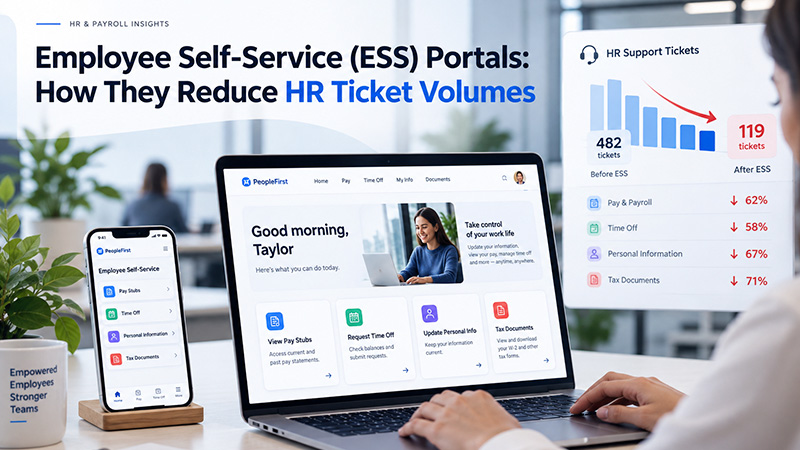
An employee self-service portal changes who does that work. Instead of routing every routine question through HR, the portal lets employees view permitted information and complete supported actions on their own. This guide covers how that shift works, which requests suit self-service, which should stay with HR, and what to evaluate in employee self-service software. Results depend on configuration and adoption, so it promises no specific drop in requests.
What Is an Employee Self-Service Portal?
An employee self-service portal, also called an ESS portal or employee portal, is a secure digital interface where employees can access permitted HR and payroll information and perform supported tasks themselves. SHRM lists typical examples: updating personal details, viewing pay slips, submitting leave requests, and reading policies without contacting HR.
It helps to separate four kinds of interaction:
- Information access: viewing pay stubs, payroll history, or tax documents.
- Employee-initiated updates: changing permitted details, such as a mailing address or emergency contact.
- Workflow requests: submitting something that needs review, such as a leave request, where the system supports it.
- HR-managed exceptions: anything the portal cannot resolve, which goes to a person.
ESS does not mean HR disappears. Routine lookups and simple updates move to the employee; people stay involved wherever judgment is needed.
How Employee Self-Service Portals Reduce HR Workload
The mechanism is a change in the path a request takes. Without self-service, the path is:
Employee question or request → HR intervention → repeated manual work
With self-service, it becomes:
Employee → self-service portal → information or action → HR handles exceptions
A few examples show the difference:
- Pay information. Before: an employee asks HR where to find pay details, and HR searches the payroll system and replies. With ESS: the employee logs in and views permitted payroll information. No HR step.
- Tax documents. Before: HR locates a W-2 copy and sends it. With ESS: the employee retrieves available documents from the portal.
- Address change. Before: the employee tells HR, and HR re-types the change. With ESS: the employee submits the permitted update directly, which also removes a re-keying step where typos can creep in.
- Time-off balance. Before: HR checks a balance and replies. With ESS: the employee checks it in systems that track it.
Across a year and a full workforce, that can free time for exceptions, employee relations, compliance, and higher-value work. How much depends on request volume, portal capabilities, and adoption. Vendor percentage claims are rarely independently verified, so measure your own baseline of routine requests before and after launch.
|
HR Request |
Traditional Process |
ESS Process |
Potential HR Impact |
|
Pay information |
Employee contacts HR |
Employee accesses permitted information |
Fewer routine questions |
|
Tax documents |
HR provides or directs employee |
Employee accesses available documents |
Less manual handling |
|
Personal information |
Employee requests update |
Employee submits permitted update, where supported |
Fewer administrative requests |
|
Time-off information |
Employee asks HR |
Employee checks available information, depending on system configuration |
Reduced repetitive questions |
|
Payroll questions |
HR answers routine questions |
Portal provides relevant information |
HR handles exceptions |
What Tasks Can Employees Handle Through Self-Service?
Commonly offered ESS capabilities include:
- Viewing pay stubs and payroll history
- Accessing available tax documents
- Updating permitted personal information
- Viewing time-off information
- Reading company documents and policies
- Reviewing available benefits information
Other capabilities, such as leave requests, broader employee records, or benefits changes, depend on the employer's software and configuration, and sensitive changes may need extra verification. Do not assume any portal includes everything listed here.
One compliance detail: according to the IRS, an employer may furnish Form W-2 electronically only if the employee consents and required disclosures are provided, so W-2 access usually involves a consent step.
How ESS Portals Reduce Repetitive HR Requests
Value comes from categories of requests:
- Information requests. Employees find answers, like payday schedules, without contacting HR.
- Status requests. Employees check a balance or record themselves.
- Simple administrative changes. Employees may submit permitted updates directly.
- Document requests. Employees open available documents instead of waiting.
- Routine payroll questions. Employees review available payroll information first.
The greatest value often comes from high-volume, low-complexity requests. A five-minute question asked dozens of times a month beats a rare, complicated case.
Which HR Requests Should Still Go to HR?
Self-service is not a replacement for HR. Some situations need human review, including:
- Complex payroll discrepancies
- Sensitive employee relations matters
- Unusual leave situations
- Policy interpretation
- Compliance questions
- Disputes
- Accommodation requests
- Termination-related issues
- Anything requiring management approval
A well-designed portal reduces routine requests while preserving a clear path to human support. An analyst quoted in SHRM reporting on self-service made a similar point: tools cannot answer every inquiry, so better ones build in a human fail-safe.
What Should an Employee Self-Service Portal Include?
Focus on capabilities that determine whether the portal deflects requests and protects data:
- Secure authentication. Portals hold pay and identity data. CISA advises that any multifactor authentication beats none, and phishing-resistant methods are stronger.
- Role-based access. Employees see only their own records; managers and administrators see what their roles require.
- Payroll information and documents. Pay stubs, payroll history, and tax documents are frequent requests.
- Profile management. Employees maintain permitted details without HR re-keying.
- Requests, notifications, and status visibility. Employees who see a request's status do not need to ask.
- Clear navigation and mobile access. A portal employees cannot use reduces nothing.
- Audit trails. A log shows who changed what and when.
- Integration and escalation. The portal should use your payroll data and offer a route to a person.
Employee Self-Service Portal for Small Businesses
Small businesses often assume self-service is for large enterprises. The relevant math is employee count, repetitive questions, and limited administrative capacity. A small HR team, or an owner handling HR alongside everything else, has fewer people to answer routine questions, so direct employee access to appropriate information can reduce manual administrative work.
Not every small business needs an ESS platform; with a handful of employees and few requests, the overhead may not pay off. Evaluate:
- Cost: fees and what is included
- Ease of implementation: setup effort
- Payroll integration: whether it uses your payroll data
- Employee adoption: whether staff will log in
- Security and support: protections and help available
- Required features and scalability: needs now and as you grow
Employee Self-Service Software for Payroll and HR
ESS works best as one layer in a broader payroll and HR environment. A typical flow looks like this:
Payroll system → employee data → employee portal → employee access or request → HR workflow
Integration matters because the portal is only as useful as its data. If employees view payroll information, the portal needs accurate, appropriately permissioned data from the payroll system. A separate copy may show outdated figures and send employees back to HR.
Do not assume real-time updates. Ask vendors how and when data syncs, which system holds the official record, and what happens when an employee-submitted change affects payroll.
How to Reduce Repetitive HR Requests Beyond Self-Service
Reducing HR workload is a process and technology problem, not just a software purchase. Portals work better alongside a searchable knowledge base, clearer written policies, automated notifications such as payday reminders, standardized request workflows, proactive payroll communication, employee training on the portal, and escalation rules that define what goes to HR.
If employees keep asking the same question, the answer may be unclear, and a better explanation may help more than a new feature.
How to Evaluate Employee Self-Service Software
Ask these questions:
- What employee questions generate the most HR requests?
- Can employees access that information themselves?
- Which actions can be completed without HR intervention?
- Does the portal integrate with payroll?
- What information can each role access?
- How are sensitive records protected?
- What happens when self-service cannot resolve an issue?
- How easy is the system for employees to use?
- What reporting or audit capabilities are available?
- What support does the provider offer?
Start with question one: sort recent HR requests by type. That list should drive your choice.
How PayProNext Fits Into Payroll Self-Service
The PayProNext Handbook documents an online employee self-service portal where employees can access pay stubs, tax documents, and payroll history, and can revise their data and complete other payroll-related transactions. The handbook lists a free employee portal in both plans, Basic Payroll at $7 per month and Full Service Payroll at $15 per month, each with a one-month free trial.
The documented scope is payroll-centered. The handbook does not describe portal features such as leave requests, time-off balances, request tracking, or role-based permissions, so confirm those directly. For employers, it lists payroll, payroll tax, and HR reports, access to professionals for payroll administration questions, and integration with existing accounting or HR software. If most routine requests concern pay and tax documents, that is where a payroll portal can help most.
Frequently Asked Questions
What is an employee self-service portal?
An employee self-service portal is a secure online system where employees view permitted HR and payroll information, such as pay stubs and tax documents, and complete supported tasks, like updating personal details, without contacting HR. Features depend on the software and its configuration.
How does an ESS portal reduce HR workload?
It moves routine, employee-specific requests away from HR. When employees look up pay information, documents, or balances themselves, HR answers fewer repetitive questions and spends more time on exceptions, compliance, and employee relations.
What tasks can employees handle through self-service?
Common examples include viewing pay stubs and payroll history, accessing available tax documents, updating permitted personal information, checking time-off information, and reading company documents. Capabilities vary by system, so confirm what a specific portal supports.
Can an ESS portal reduce HR tickets?
It can reduce certain categories of repetitive requests, but the impact depends on portal capabilities, employee adoption, and which requests suit self-service. Track your own request volume before and after implementation.
What should an employee self-service portal include?
Prioritize secure authentication, role-based access, payroll and document access, profile management, request and status visibility, clear navigation, audit trails, payroll integration, and a route to human support.
Is employee self-service suitable for small businesses?
Often, particularly when a small team fields many repetitive questions. It may be unnecessary for very small workforces with few requests. Evaluate cost, setup effort, payroll integration, adoption, security, support, and scalability.
How does employee self-service improve HR efficiency?
By shifting routine information access and supported actions to employees, ESS reduces manual lookups and re-keying. HR can then focus on exceptions, policy questions, and higher-value work.
Conclusion
The goal of employee self-service is not to remove HR from the process. It is to keep HR from spending unnecessary time on routine requests that employees can safely handle themselves. Match the portal to your highest-volume, lowest-complexity requests, and keep a clear path to a person for everything else.
If pay and tax document questions dominate your inbox, review your request history and see whether a payroll portal covers them. The PayProNext team can walk you through the documented portal at info@paypronext.com.